
Images
By default, physical exam findings and diagnostic results are reported in text form.
If you want to test the learner’s ability to interpret visual findings, you can upload an image and require the learner to interpret it before seeing the intended textual report. Images can be included instead of, or in addition to the textual report.
Images are useful when the case depends on visual interpretation, such as reading an X-ray, identifying a rash, or recognizing an abnormal ECG pattern.
Adding images
Section titled “Adding images”You can add images to both physical exam tests and diagnostics by clicking the Add image button in the scenario creation form.
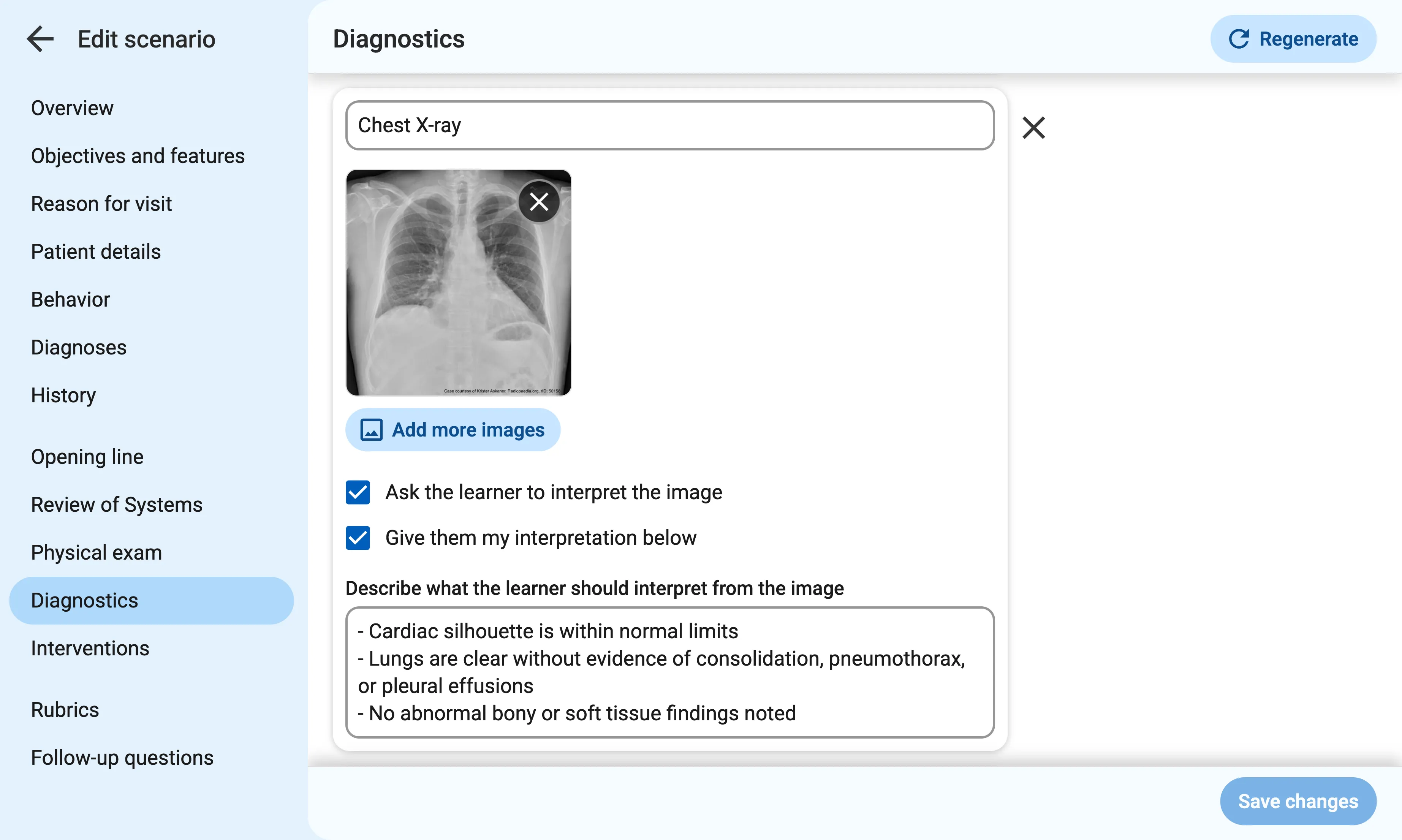
When you attach an image, you can choose from the following options:
- Ask the learner to interpret the image: When turned on, learners will be prompted to provide their own interpretation of the image before seeing your intended interpretation (if enabled).
- Give them my interpretation: This option lets you provide the interpretation you want the learner to reach, to prevent them from going off-track if they misinterpret what they see.
Use the Describe what the learner should interpret from the image field to explain the key finding you want the learner to recognize in the image. This field is required even if you opt not to provide it to the learner, because the AI grader needs to understand what the image shows.